License Activation

Firstly thanks for purchasing! We're so glad you chose our theme and hope it satisfies your needs! The steps below assume that you already have WordPress installed, if you don't go here for a WordPress installation guide.

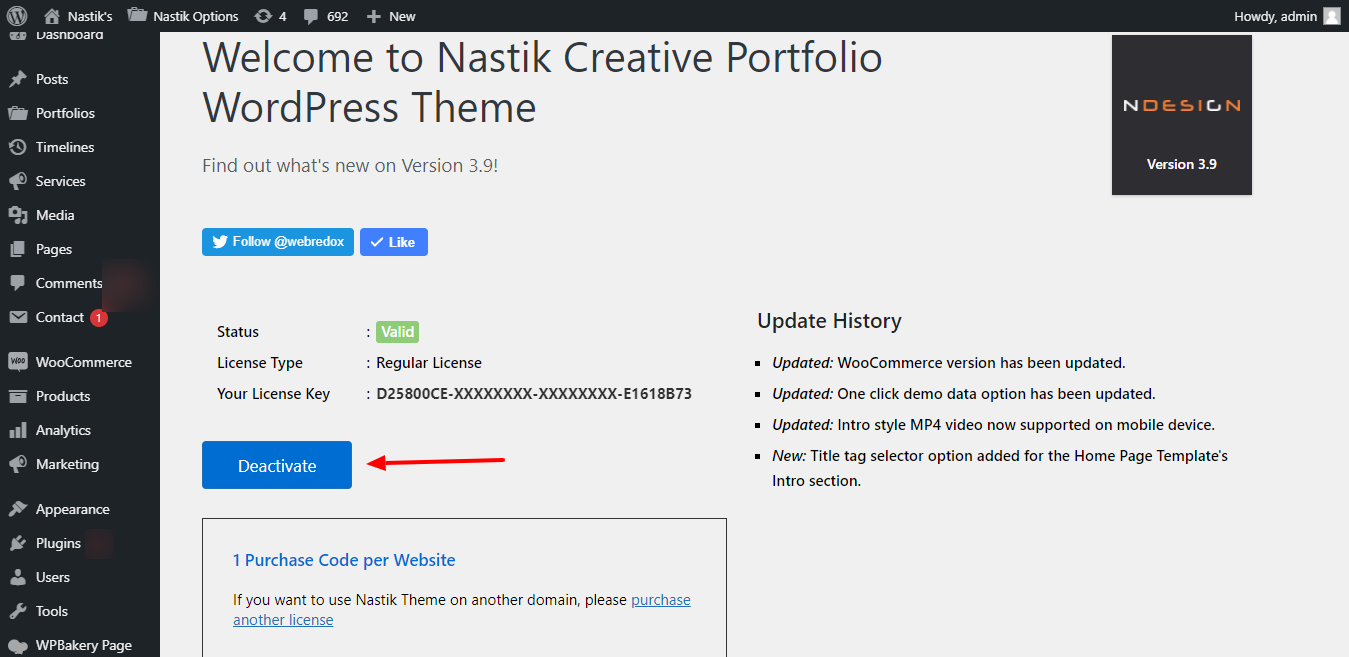
License Activation

  1. After install and active the theme go to About Nastik option and add your purchase code.

  2. Find your purchase code here

License Deactivation

  1. Before moving to the another domain, go to About Nastik option and deactive your purchase code.


Test/ Staging Domain List

Listed domains will be license without any restriction. You just need a valid license key.


  1. localhost
  2. *.dev
  3. *.test
  4. *.local
  5. local.*
  6. *.staging
  7. staging.*
  8. *.example
  9. *.invalid
  10. *.dev.css (DesktopServer)
  11. *.myftpupload.com (GoDaddy)
  12. *.cloudwaysapps.com (Cloudways)
  13. *.wpsandbox.pro (WPSandbox)
  14. *.ngrok.io (tunneling)